COD (J&T)
- "Before your rider arrives" card
- Confirm on Messenger button
- Add-on joins the same COD order

Same order, same customer. Scroll inside each phone.
Before today
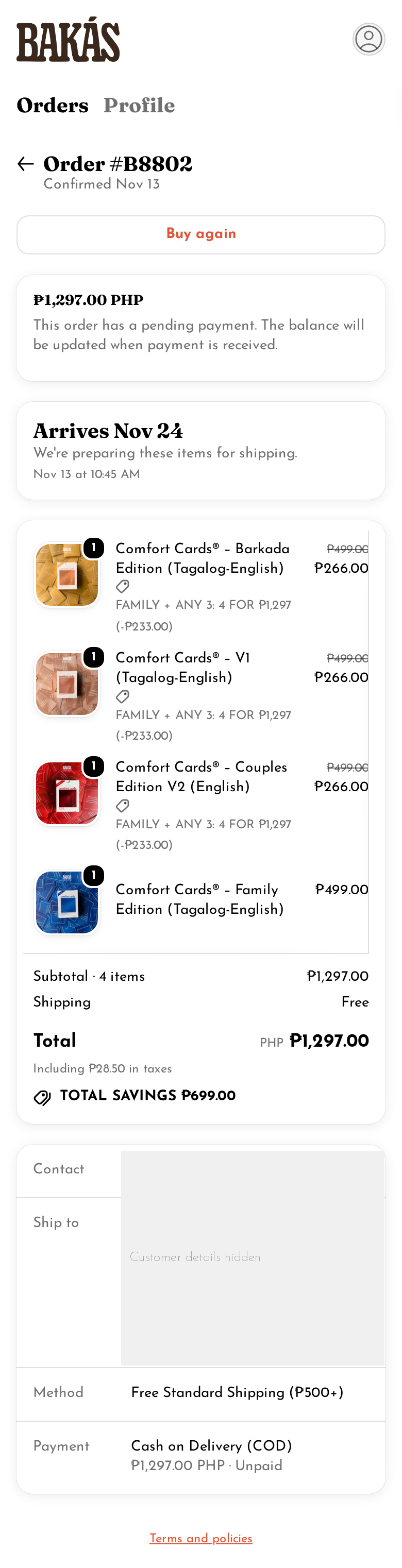
Today: the Order status page a COD customer sees (real order, customer details hidden).
The Thank you page right after paying uses the same Shopify default layout, plus "Thank you, NAME" and an address map. No Bakás content, no next steps.
Shopify shows its own "Arrives Nov 24" estimate on a Nov 13 order. That estimate comes from Shopify's delivery settings.
Today: the same page for a Lalamove order. Notice there's no rider info and no pin help.
After live prototype
Bakás blocks inside Shopify's page: next steps, COD reminders, add-on, how to play.
The page changes with delivery and payment. Tap to switch.
One calm card: "Add to your order". Best 1 or 2 options.

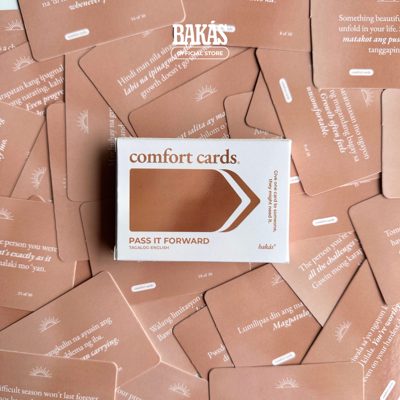
₱599 Free nationwide shipping
Always first"For the answers worth keeping. Write down what came up after each round, then hand the Pass It Forward deck to a friend you want to talk with more."

₱499 Price to confirm
Second slot, if not in the order"For the next family get-together. Play it at home with your parents, siblings and cousins, one card at a time."
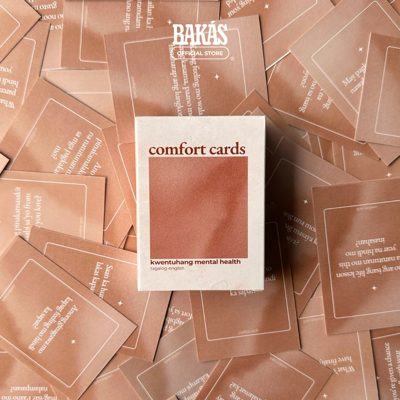
₱499
Second slot, if Family is in the order"The deck that started it all. An easy gift for a friend, or a good first deck for nights in."
The chip on the card. The add-on rides with the order they just placed.
No countdowns, no "today only", no "limited", no crossed-out prices.
Journal and Pass It Forward are slow. Family has the deepest stock.
See the numbersShopify, last 30 days, pulled Nov 13, 2026. 667 orders in total.
| Product | Items sold 30d | Share of orders | Stock cover |
|---|---|---|---|
| Comfort Journal Slow | 9 | 1.3% | ~310 months |
| Pass It Forward deck Slow | 45 | 6.7% | ~38 months |
| Family Edition deck Overstocked | 336 | 46% | ~45 months |
| Comfort Cards Original (V1) Moving | 329 | 47% | ~6.6 months |
| For context: Barkada deck | 410 | 58% | ~4.7 months |
| Slot | Shows | Unless |
|---|---|---|
| 1 | Journal + Pass It Forward bundle | The order has the Journal or Pass It Forward |
| 2 | Family Edition deck | Family is in the order. Then V1 shows instead |
| 2 | Comfort Cards Original (V1) | V1 is in the order too. Then nothing shows |
Barkada, V1, Couples V2, Family
Bundle onlyBarkada, Small Talks, GTKY
Bundle + FamilyFamily, GTKY, Moving On
Bundle + V1Max 2 options. Turn on "Show what's ours" in Variants to see the reason on each one.
One tap, one confirm, pay the rider. The COD total updates.
Lalabot edits the unpaid COD order with Shopify's order editing API: adds the item and a line discount to reach ₱599, then commits and emails the customer. Works only before the order is fulfilled.
Opens a quick checkout with details filled in. Packed with the first order.
A cart link to a prefilled checkout, with a note linking the first order. Lalabot or Flow tags both orders "merge-ship" so the warehouse packs them together.
Lalamove: the add-on must be paid before the 3 PM rider batch to ride along. After that it ships the next working day. The card says "Pay before 2 PM to ride with today's delivery."
It is skipped for COD and for offsite gateways like Xendit. It would almost never show for Bakás.
Sources: Shopify dev community, AfterSell docs
COD: add to the same order, pay the rider. Prepaid: quick checkout, merged at packing.
What the research says, and what we do with it.
Clear confirmation, order summary, expected arrival, and a "confirmation emailed" note.
What we do Shopify's header and summary stay. We add the delivery window.
Say the next steps, and how to cancel or change.
What we do A 3 step timeline per delivery method, plus "Change or cancel".
Baymard cites Burger King's delivery map, timeline and courier contact.
What we do Rider pin and landmark for Lalamove, plus the timeline.
Right after checkout, with Confirm, Change and Cancel buttons.
What we do "Confirm my order on Messenger" on COD orders.
Cancelling before dispatch is cheaper than a parcel that comes back. These are WhatsApp and India guides. We adapt them to Messenger and Viber.
Sources: Omnichannels, Mark360
Ask for the review a week or two after delivery, not on the thank you page.
What we do Social follow and share on the page. The review email comes after delivery.
Sources: Shopify blog, Practical Ecommerce
Invite shoppers to refer a friend after a good first experience.
Our take Later, after delivery. Not now, there's no program yet.
Cross-sells with an "Add to order" button work here without interrupting checkout.
What we do "Add to your order", 1 or 2 options, no coupons.
Next-order discount coupons on the thank you page. They can make shoppers cancel and reorder.
Sources: Baymard, Practical Ecommerce
Offer it after checkout, not before.
What we do A "Save your details for next time" line.
Our store already uses Shopify customer accounts, so the Order status page is in their account.
What Shopify allows on our plan.
The map uses Shopify's s-map click event. The pin and landmark are saved by the Lalabot backend to an order metafield.
Browser location is blocked inside Shopify extensions, so the button opens a small Bakás page from the block.
The session token proves the shop, not the order. So the backend also checks the order's confirmation number and age.
The live blocks use Shopify's own components, so they will look plainer than this prototype.
Nothing happens until John says yes to each marked step.
Review this preview on a phone
Agree on copy and block order. Leave notes with Comment.
Decide the add-on offer Approval: John
Bundle product or line discount at ₱599, the free shipping rule, the Family price.
Confirm the Messenger setup Approval: John
Page username and how the ref in the link is handled. Viber link optional.
Copy the extension into the Lalabot app
Install dependencies and settle every VERIFY note in the code.
Create the Google Maps key Approval: John
Needs billing on the Google account. Restrict the key.
Dev Dashboard settings
Turn on network access. Request protected customer data access.
Deploy the Lalabot backend Approval: John
The Worker and its secrets: pin, location page, add to order.
Test on a dev store
A test order per variant, each add-on path, the Order status page.
Deploy a new Lalabot app version Approval: John
Adds write_order_edits, and write_orders if missing. The store approves the new permission.
Set up the "merge-ship" tag Approval: John
Flow or Lalabot tags the add-on order and the first order. Brief the warehouse.
Set checkout branding Confirm with John
Colours, fonts, logo. Customers see it.
Add the blocks in the checkout editor Approval: John
Thank you page and Order status page. This is the moment customers see it.
Switch the 3 PM batch to read the pin Approval: John
Until then saved pins are stored but not used.
Full plan, test plan and risks: BUILD-PLAN.md.
Comment mode is on. Tap anywhere to drop a pin.